Drint Knowledge › Packaging glossary › Trapping
Trapping
A slight overlap added where two inks meet, so small shifts in registration on press do not open thin white gaps between the colours.
- Also called
- trap, spread, choke, colour overlap
- Kind
- Print & finishing
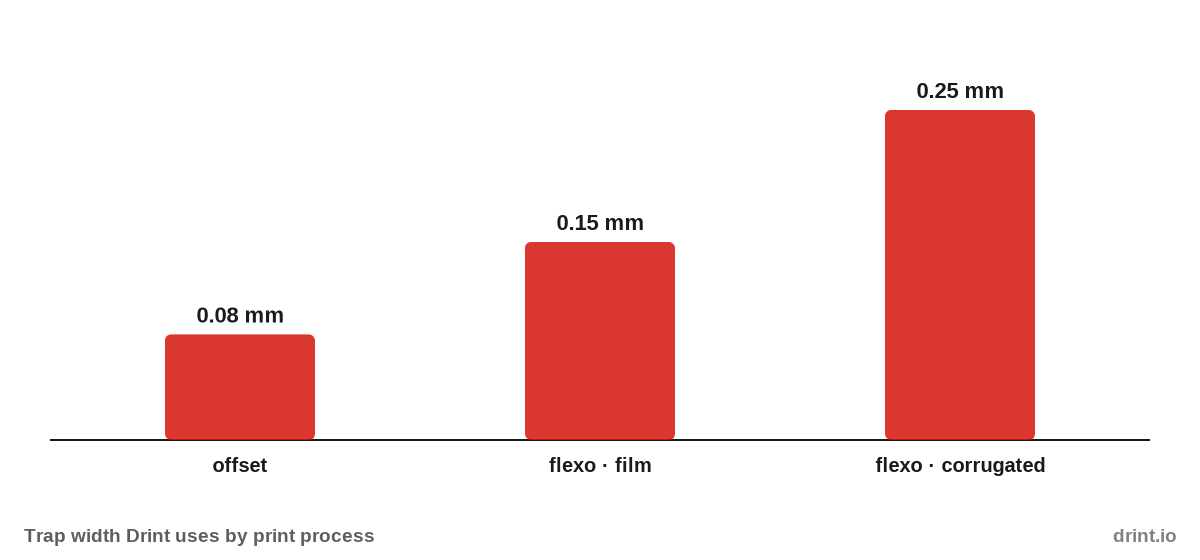
- Trap width Drint uses
- offset: 0.08 mm
flexo · film: 0.15 mm
flexo · corrugated: 0.25 mm - Measured
Each ink is printed by its own plate, and the sheet or web never lands in exactly the same place for every colour. Trapping enlarges one colour a fraction under its neighbour: a spread grows the lighter object outward into a darker background, and a choke grows a lighter background inward under a darker object, so the visible edge keeps the shape of the darker colour.
Traps matter most where two spot or process colours butt against each other with no shared ink, such as a coloured logo knocked out of another solid. The width depends on the press and process: flexo and corrugated printing move more than sheet-fed offset and need wider traps, while small black text is usually overprinted instead of trapped. Ask the printer whether they trap in their own workflow before adding traps by hand, so the overlap is not applied twice.
Questions
What is a trapping?
A slight overlap added where two inks meet, so small shifts in registration on press do not open thin white gaps between the colours.
Do I need to trap colours that share an ink?
Usually not. If both colours contain a good share of the same process ink, that ink fills any gap, so the misregistration is hard to see.
More terms
Cite this page: Drint (2026). “Trapping”. Drint Knowledge. https://drint.io/glossary/trapping