Drint Knowledge › Packaging glossary › Total area coverage
Total area coverage
The sum of the cyan, magenta, yellow and black percentages at any one spot of a print file, capped so the press can lay and dry the ink without problems.
- Also called
- TAC, ink limit, total ink limit, maximum ink coverage
- Kind
- Print & finishing
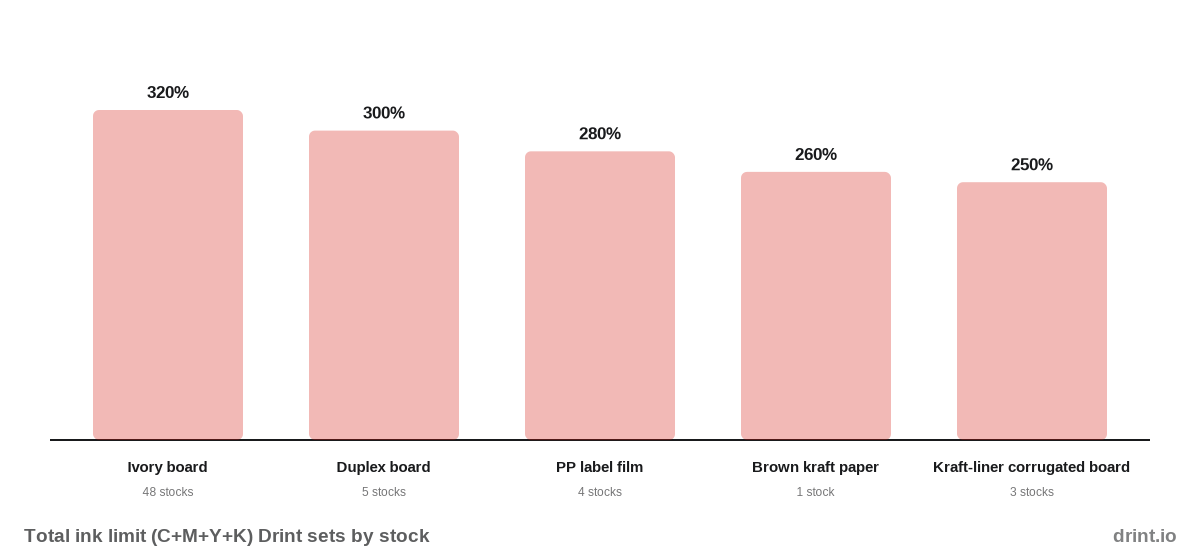
- Ink limit Drint sets
- Ivory board +47: 320%
Duplex board +4: 300%
PP label film +3: 280%
Brown kraft paper: 260%
Kraft-liner corrugated board +2: 250% - Measured
Every point of a CMYK file carries four tint values, and adding them gives that point’s total coverage: a pure four-colour solid would reach 400%. No press and stock can carry that much wet ink, so each printing condition has a maximum, and the ICC profile used for the CMYK conversion builds that maximum into its dark colours.
Too much ink causes set-off between stacked sheets, slow drying, cracking on folds and muddy shadows, which is a real risk on cartons that are creased and glued soon after printing. Convert images with the profile that matches the job rather than hand-building deep blacks, check the darkest areas with a separation preview, and remember that the limit depends on the stock and press: uncoated board, newsprint-like papers and flexo usually take less ink than coated sheet-fed offset.
Questions
What is a total area coverage?
The sum of the cyan, magenta, yellow and black percentages at any one spot of a print file, capped so the press can lay and dry the ink without problems.
Why does my black look grey after conversion?
The profile pulled the darkest colours under its ink limit. That is intended; use a rich black built within the limit for large solids instead of pushing all four inks higher.
More terms
Cite this page: Drint (2026). “Total area coverage”. Drint Knowledge. https://drint.io/glossary/total-area-coverage