Drint Knowledge › Packaging glossary › ICC profile
ICC profile
A standard data file that describes how a device or printing condition reproduces colour, used to convert artwork between colour spaces predictably.
- Also called
- colour profile, output profile, CMYK profile
- Kind
- Print & finishing
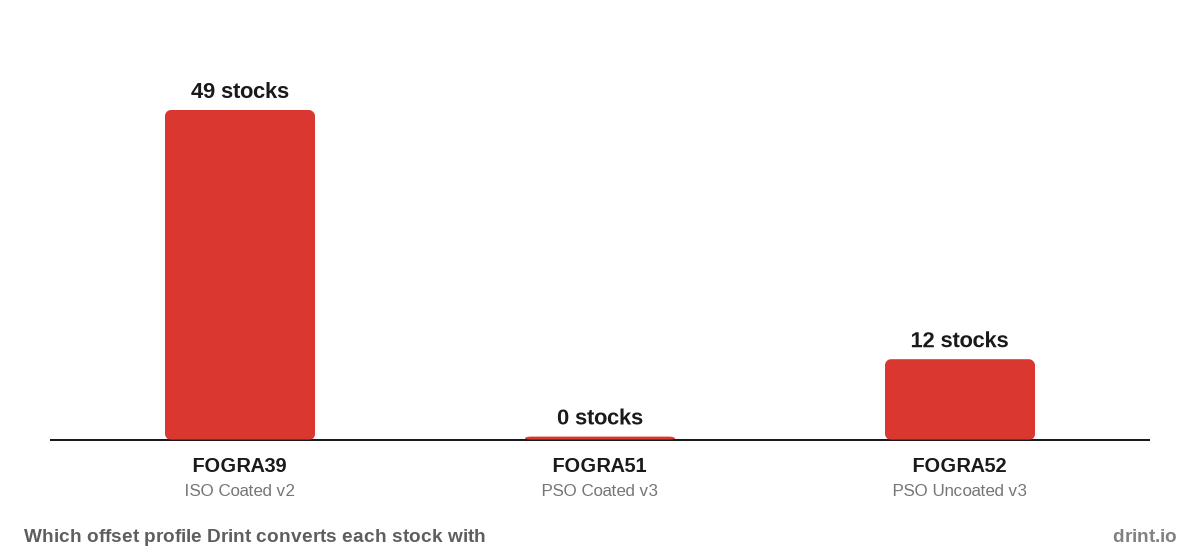
- Stocks per profile
- ISO Coated v2 (FOGRA39): 49
PSO Coated v3 (FOGRA51): 0
PSO Uncoated v3 (FOGRA52): 12 - Measured
An ICC profile maps the device’s own values, such as CMYK percentages on a given paper and press, to a device-independent colour space. Colour-managed software uses two profiles at once, source and destination, to translate RGB photos into CMYK or one CMYK condition into another, and a CMYK output profile also decides the ink limit and how much black replaces the other inks in dark tones.
Pick the output profile that matches how the job will really print: coated or uncoated stock, offset or flexo, and the standard the printer works to. Convert to that profile once, embed or declare it in the print PDF as the output intent, and avoid converting the same file repeatedly through different profiles, which shifts colours and can push deep tones over the ink limit.
Questions
What is a icc profile?
A standard data file that describes how a device or printing condition reproduces colour, used to convert artwork between colour spaces predictably.
Which profile should I use if the printer gives none?
Ask for their printing standard; if none is given, a widely used reference profile for the paper type (coated or uncoated) is the safest neutral choice.
More terms
Cite this page: Drint (2026). “ICC profile”. Drint Knowledge. https://drint.io/glossary/icc-profile