Blog › EU AI Act Article 50 and AI Packaging Images
EU AI Act Article 50: what AI-made packaging images must carry by 2 December 2026
 By Nguyễn Thành Dân, Founder of Drint ·
Under Article 50(2) of the EU Artificial Intelligence Act, providers of AI tools that generate images must mark each output "in a machine-readable format" as artificially generated or manipulated. The duty has applied since 2 August 2026. Tools already on the market before that date have until 2 December 2026.
Why it matters: packaging artwork, patterns and product shots made with AI image tools now leave those tools with a hidden label. Designers who strip it during export, or who publish realistic AI images without saying so, may break the chain the law relies on.
Key points
- Who must mark: the provider of the AI system, not the designer using it. Article 50(2) covers systems "generating synthetic audio, image, video or text content".
- From when: the European Commission's guidelines state: "These transparency obligations apply from 2 August 2026."
- Grace period: Regulation (EU) 2026/1744, the Digital Omnibus on AI, gives providers of systems placed on the market before 2 August 2026 until 2 December 2026 to comply with Article 50(2).
- Fines: up to EUR 15,000,000 or 3% of worldwide annual turnover, whichever is higher, under Article 99(4)(g). For small and medium-sized companies, the lower of the 2 applies (Article 99(6)).
- Designers' own duty: deployers must disclose deep fakes under Article 50(4). Most illustrated packaging art is not a deep fake; photorealistic depictions of real people, places or products can be.
- Drint's test: of 8 common export paths, 4 removed the mark from a labelled PNG. Every export through a browser canvas, the route most web editors use, lost it.
What does Article 50(2) require?
Article 50(2) of Regulation (EU) 2024/1689 sets 2 conditions for AI-generated output. It must be "marked in a machine-readable format" and "detectable as artificially generated or manipulated".
The technical solutions must be "effective, interoperable, robust and reliable as far as this is technically feasible". The law does not name one technique. Watermarks, metadata and content credentials are all candidates.
The paragraph exempts AI that only performs "an assistive function for standard editing" or does not substantially alter the input. A tool that sharpens a photo slightly is treated differently from one that draws a new label illustration.
Why 2 December 2026, not 2 August?
The original AI Act applied Article 50 from 2 August 2026. On 8 July 2026, the European Parliament and the Council adopted Regulation (EU) 2026/1744, published in the Official Journal on 24 July 2026.
Its Article 1(39)(b) adds a transitional rule to Article 111 of the AI Act. Providers of systems "generating synthetic audio, image, video or text content, that have been placed on the market before 2 August 2026" must comply with Article 50(2) "by 2 December 2026".
The European Parliament's press release of 16 June 2026 described the same change as delaying "watermarking obligations on AI-generated content until 2 December 2026".
The grace period covers only the provider's marking duty. Deployer duties under Article 50(4) have applied since 2 August 2026.
Is the packaging designer a provider or a deployer?
In most studios, the designer is a deployer: a person or company that uses an AI system under its own authority. The company that builds and sells the image tool is the provider.
A studio becomes a provider when it builds its own image generator and places it on the market, or puts its name on one. Fine-tuning a model for in-house use and selling access to it can also change the role. Each case needs its own legal reading.
When does a packaging image count as a deep fake?
Article 3(60) defines a deep fake as AI-generated or manipulated image, audio or video content that resembles existing persons, objects, places, entities or events and would falsely appear authentic or truthful.
For packaging, the line runs roughly here:
| Image on the pack or listing | Likely a deep fake? |
|---|---|
| Illustrated pattern, mascot or lettering | No: it does not pretend to be real |
| Stylised fruit, botanicals or scenery | Usually no |
| Photorealistic shot of the actual product, made by AI | Possibly: it may appear to be a photo of a real object |
| Realistic person holding or using the product | Likely: it resembles a real-looking person |
| Real location shown as the product's farm or factory | Likely, if the scene is invented |
Article 50(4) eases the duty for "evidently artistic, creative, satirical, fictional or analogous" work: disclosure may be made in a way that does not hamper the display of the work. Article 50(5) requires the information "at the latest at the time of the first interaction or exposure".
This table is Drint's reading of the text, not legal advice. The Commission's guidelines of 20 July 2026 give worked examples.
What do the Code of Practice and the guidelines add?
The Commission published the final Code of Practice on Transparency of AI-generated Content on 10 June 2026. It has a provider section on marking and detection and a deployer section on labelling. Adherence is voluntary; Article 50 itself is a legal obligation.
By the end of July 2026, about 190 organisations had signed the Code, according to the Commission's page. Signing helps a provider show compliance; it is not required.
How does the machine-readable mark work in a file?
The most widely read mark in image files is the IPTC Digital Source Type property, stored in a file's XMP metadata. The International Press Telecommunications Council (IPTC) publishes the terms.
2 terms matter for packaging work:
trainedAlgorithmicMedia: the image was created by a generative AI model.compositeWithTrainedAlgorithmicMedia: a real image was edited with generative AI, for example a removed background or an extended frame.
Google reads the same vocabulary. According to the IPTC, "Google already surfaces Digital Source Type information in search results via the 'About this image' feature", and in October 2024 it extended that use to Google Photos.
Metadata can be lost on export. Drint measured how often.
Which exports keep the AI mark? Drint's test
On 20 November 2026, Drint labelled one PNG with trainedAlgorithmicMedia, using the same function Drint AI runs on its downloads. The file then went through 8 export paths a packaging designer commonly uses. Each result was searched for the DigitalSourceType field, with compressed PNG text chunks inflated first.
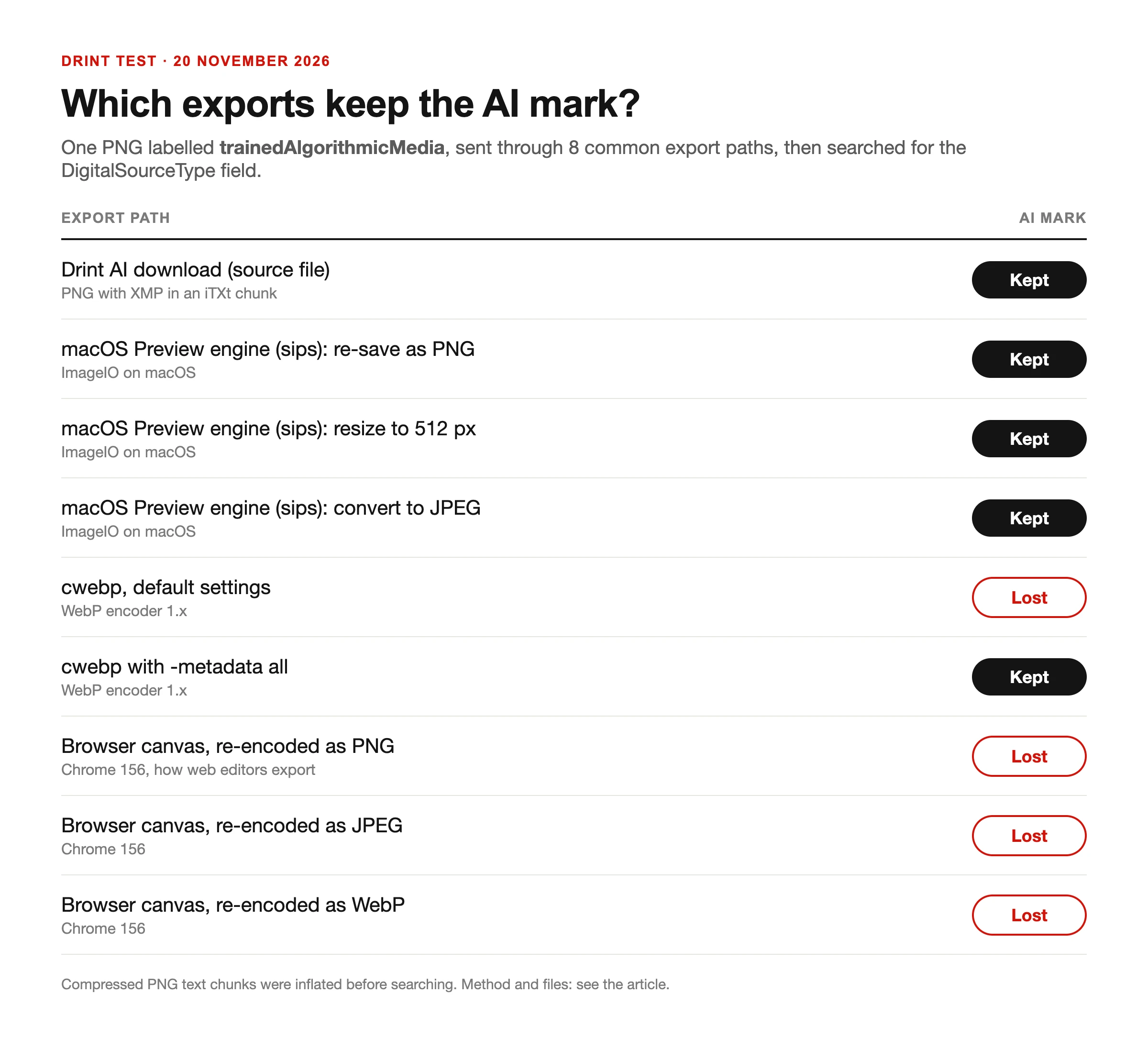
| Export path | Tool | AI mark |
|---|---|---|
| Re-save as PNG | macOS ImageIO (sips, the engine behind Preview) | Kept |
| Resize to 512 px | macOS ImageIO | Kept |
| Convert to JPEG | macOS ImageIO | Kept |
| Convert to WebP, default settings | cwebp | Lost |
Convert to WebP with -metadata all | cwebp | Kept |
| Re-encode through a canvas as PNG | Chrome 156 | Lost |
| Re-encode through a canvas as JPEG | Chrome 156 | Lost |
| Re-encode through a canvas as WebP | Chrome 156 | Lost |
The canvas result matters most. Browser-based editors and many online compressors draw an image onto a canvas and save a new file from it. The new PNG held only image data: no text chunk survived.
A first pass that searched only for plain text reported the macOS PNG files as lost. They were not: ImageIO had rewritten the XMP in a compressed chunk. Checking tools need to read compressed metadata, or they will under-count.
Limits: one source file, one browser version, one machine. Desktop design apps, phone galleries and social networks were not tested. The test shows that a mark can disappear; it does not show how often it does in real workflows.
Whether metadata alone is "robust" enough under Article 50(2) is a question the Code of Practice and the guidelines address. Treat it as one layer, not the whole answer.
What Drint AI writes into its files
Drint AI is Drint's image app at drint.io/ai. It writes the IPTC Digital Source Type into the XMP of every PNG, JPEG, WebP and SVG it hands out. That covers downloads, batch downloads and pictures sent into a Drint library.
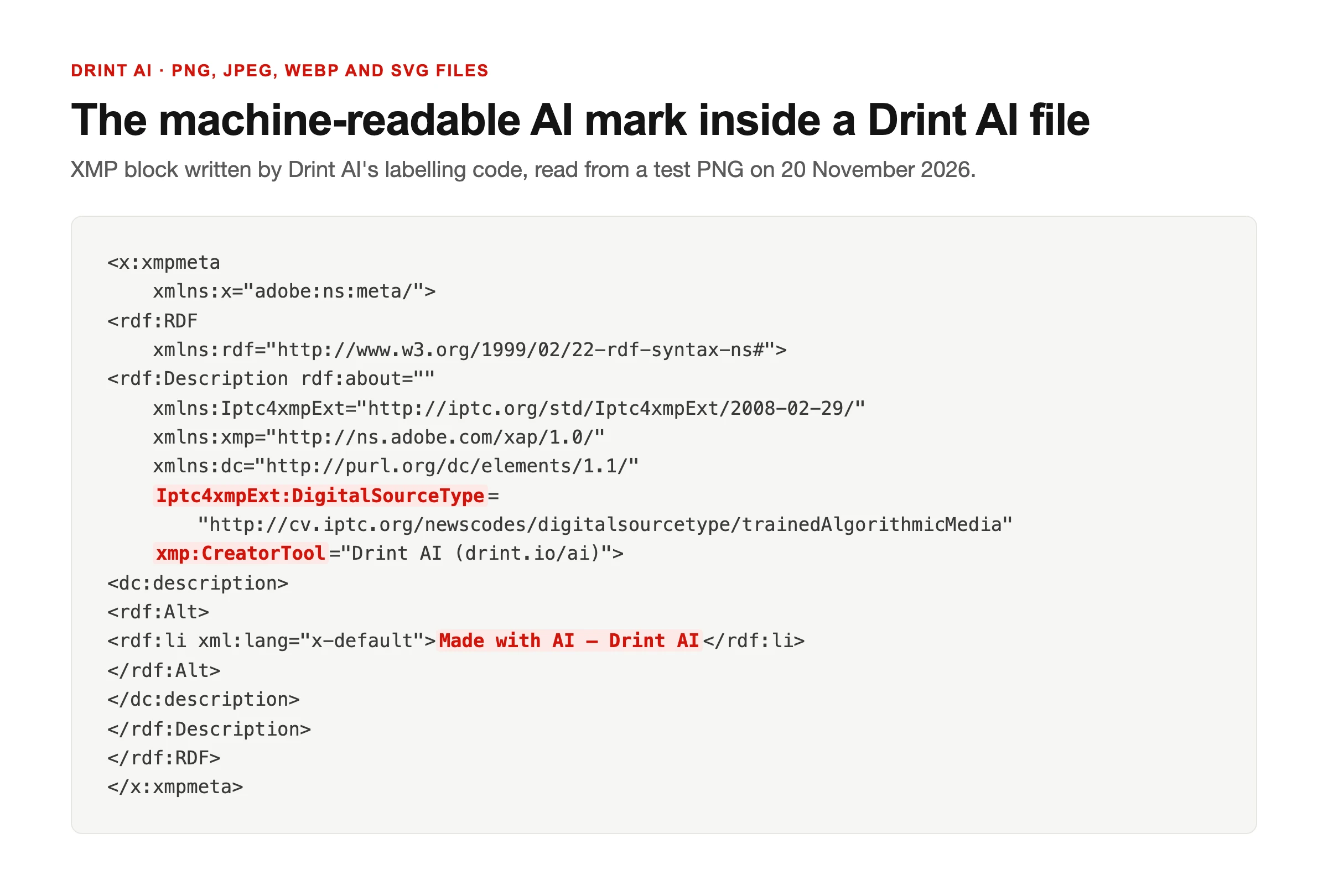
- A picture drawn from a prompt carries
trainedAlgorithmicMediaand the description "Made with AI". - A photo the designer uploaded and changed with an AI tool carries
compositeWithTrainedAlgorithmicMediaand "Edited with AI". - The
CreatorToolfield names Drint AI. - A design in the Drint editor that uses Drint AI art exports its pictures with
compositeWithTrainedAlgorithmicMedia. Editor exports are drawn through a canvas, the path that lost the mark in the test above, so Drint writes it again.
Disclosure: Drint wrote this article about its own product.
What this means for designers
Keep the mark. Before a file goes to a printer, a marketplace or a client, check that the XMP survives your export. Open the file in a metadata viewer and look for DigitalSourceType.
Avoid the paths that lost it in Drint's test. Do not run AI artwork through a browser canvas editor or an online compressor as the last step. When converting to WebP with cwebp, add -metadata all.
Decide disclosure per image, not per project. An illustrated pattern needs no notice; an AI "photo" of a person using the product needs one where the public first sees it.
Keep a record of which images on a pack or listing were AI-made, and with which tool. If a retailer or authority asks, the record is quicker than reopening files.
For label text itself, such as ingredients and warnings, AI rules do not replace product labelling law. See how Drint checks label text against 47 countries' rules and the EU cosmetics label requirements.
Sources
- Regulation (EU) 2024/1689 (Artificial Intelligence Act), Official Journal text, EUR-Lex, accessed 20 November 2026
- Regulation (EU) 2026/1744 (Digital Omnibus on AI), EUR-Lex, accessed 20 November 2026
- Procedure file 2025/0359(COD), European Parliament Legislative Observatory), accessed 20 November 2026
- AI Act: EP approves simplification measures and nudifier app ban, European Parliament, 16 June 2026, accessed 20 November 2026
- Guidelines on transparency obligations for providers and deployers of AI systems, European Commission, 20 July 2026, accessed 20 November 2026
- Code of Practice on Transparency of AI-generated Content, European Commission, accessed 20 November 2026
- Digital Source Type vocabulary, IPTC, accessed 20 November 2026
- Google AI transparency based on IPTC standards, IPTC, accessed 20 November 2026
- EU AI Act transparency rules: what went into effect on 2 August, Morgan Lewis, 12 August 2026, accessed 20 November 2026
Update
20 November 2026: Drint AI now also marks JPEG and WebP files, and the Drint editor marks pictures of designs that use Drint AI art. The first version of this article said JPEG files left Drint AI without the mark.
Next step / Try it
Open Drint AI: draw a pattern or fix a product photo, download the PNG and check its DigitalSourceType in any metadata viewer. Then place it on a real dieline in the Drint editor.
Frequently asked questions
Do I have to print "made with AI" on the box?
Not under Article 50(2): that duty is a machine-readable mark placed by the tool's provider. A visible notice is needed when a deployer publishes a deep fake under Article 50(4).
Does the 2 December 2026 date apply to me as a designer?
No. It is a transition for providers of AI systems placed on the market before 2 August 2026. Deployer duties have applied since 2 August 2026.
Is an AI-drawn illustration on a label a deep fake?
Usually not. A deep fake must resemble existing persons, objects, places or events and falsely appear authentic. Stylised art does not pretend to be real.
Which exports remove the AI mark?
In Drint's test of 20 November 2026, every browser canvas re-encode and cwebp with default settings removed it. The macOS Preview engine kept it when re-saving, resizing and converting to JPEG.
What happens if the metadata is stripped?
The image loses its machine-readable mark. The provider's duty is to mark output; designers who remove it on purpose make detection harder and weaken their own record.
What are the fines for breaching Article 50?
Up to EUR 15,000,000 or 3% of total worldwide annual turnover, whichever is higher, under Article 99(4)(g). For SMEs, the lower amount applies.