Blog › AI Packaging Pattern
How to make a seamless AI pattern for packaging and put it on a real dieline
 By Nguyễn Thành Dân, Founder of Drint ·
A seamless AI pattern becomes packaging only when it sits on a real dieline at a real tile size. On 20 November 2026, Drint AI made 2 vector tiles from one sentence for 23 credits. One of them then covered a 70 × 70 × 120 mm reverse tuck end box with 3 mm bleed.
Why it matters: most AI image tools stop at a square picture. A printer needs the pattern clipped to each panel, carried into the bleed, kept off the glue flap and sized in millimetres. This guide shows each step with the settings used.
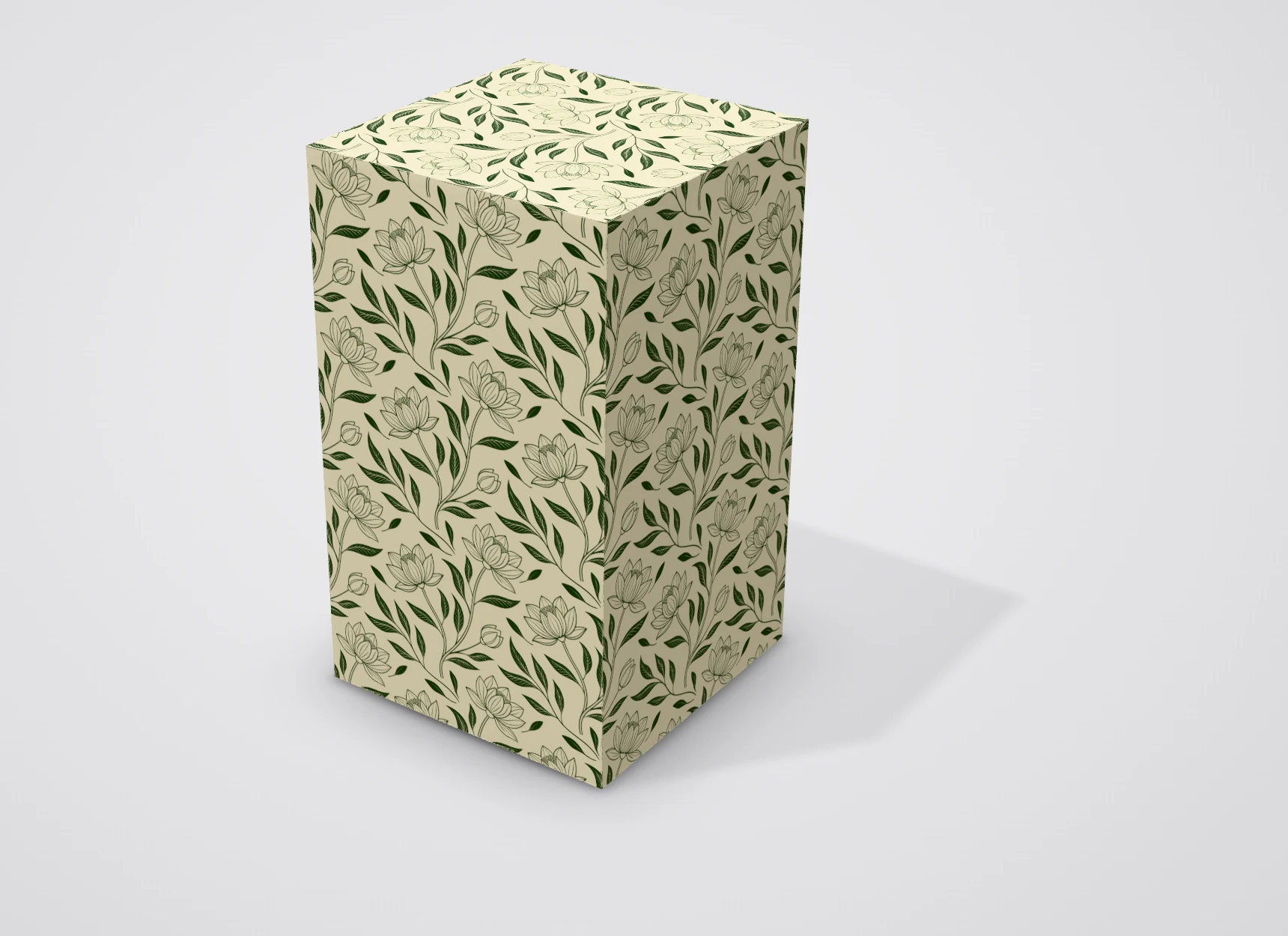
Key points
- 1 sentence, 2 tiles: Drint AI's "Repeat pattern for the whole box" job returned 2 repeating SVG tiles for 23 credits.
- Vector, not pixels: each tile is an SVG with a 2048 × 2048 viewBox, so it scales to any box without blur.
- Real die: ECMA A20.20.03.01, the reverse tuck end box, at 70 × 70 × 120 mm, with Drint's default 3 mm bleed.
- Tile size in millimetres: 35 mm per tile gave 2 repeats across each 70 mm panel.
- What AI did not do: the prompt asked for gold; both tiles came back olive. Metallic gold needs a foil plate, not a colour.
Step 1: Describe the pattern in one sentence
Open Drint AI and pick the job Repeat pattern for the whole box. It fills in the prompt, the style Seamless pattern (vector), a 1:1 frame and 2 pictures. Change only the words in square brackets.
The sentence used here:
repeat pattern of lotus flowers and tea leaves, fine line, moss green and gold, on a cream background, for a box of oolong tea
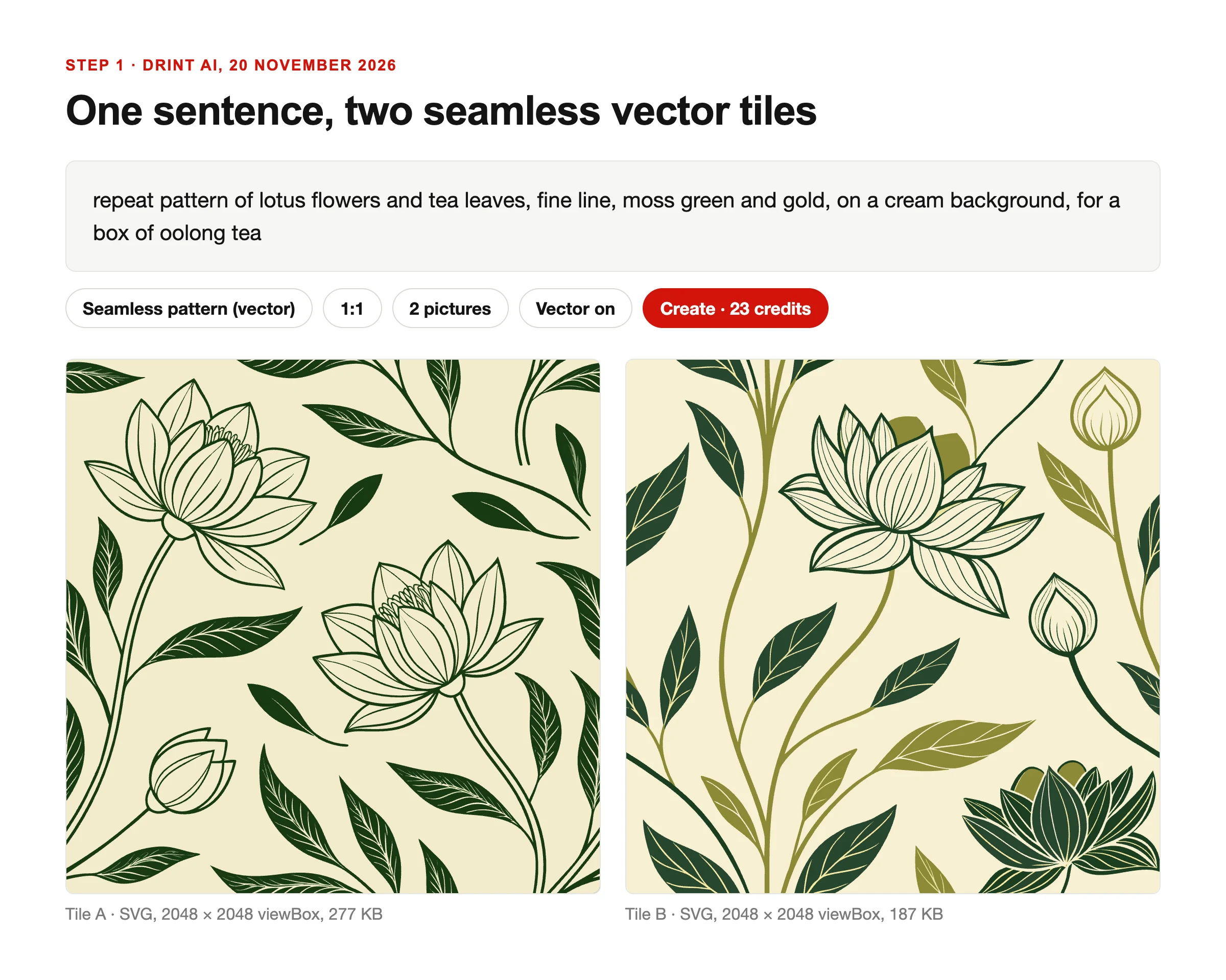
Name 3 things in the prompt: the motif, the line style and the colours. The product ("a box of oolong tea") steers the mood without adding text.
Tile A came back as dark green line art on cream. Tile B added olive leaves and filled shapes. Both repeat edge to edge.
Step 2: Send the tile into your Drint library
Press Send to Drint under a tile and choose a workspace. The SVG lands in that workspace's library, ready in the editor.
The file carries a machine-readable "made with AI" mark: the IPTC Digital Source Type trainedAlgorithmicMedia, in its metadata. Drint read it back from both files on the server. For why the mark matters, see what the EU AI Act Article 50 requires of AI images.
Step 3: Repeat it across the panels of a real dieline
Open a dieline in the Drint editor. This guide used the reverse tuck end box, ECMA code A20.20.03.01, at length 70, width 70 and height 120 mm.
Open Insert → Asset library → My library, hover the tile and press Tile across the panel. The tile covers the selected panel, or the front if nothing is selected. It is clipped to the panel and carried into the bleed.
Set the size in the inspector under Tile size: a slider from 5 to 300 mm, or presets of 20, 40 and 80 mm. This guide used 35 mm, so 2 repeats sit across each 70 mm wall. Repeat the step on each panel you want covered.
The inspector also shows the tile's print resolution and warns below 300 dpi. A vector tile stays sharp at any size.
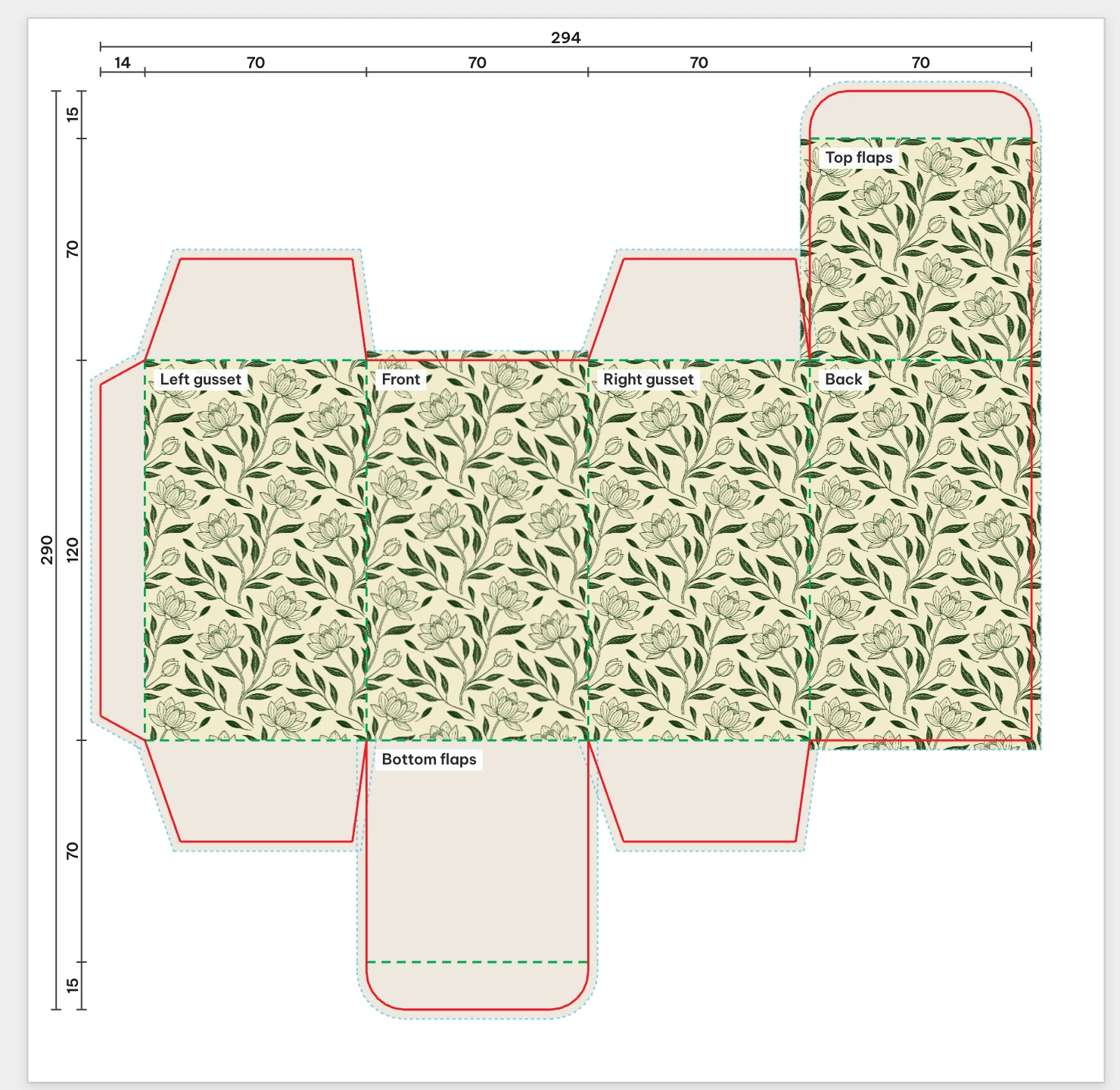
What the die shows:
- Bleed: the pattern runs past the cut line by Drint's default 3 mm, so a small trim error leaves no white edge.
- Glue flap stays blank: the 14 mm flap on the left carries no pattern. Printers often ask for an ink-free glue area so the glue holds.
- Each panel starts its own repeat. The pattern restarts at each fold. For a motif that must run unbroken around a corner, move Offset X in the inspector until the edges meet.
- It stays live. Change the box size and the repeat covers the new panels; tile size, offset and angle stay editable.
Step 4: Check it in 3D before you export
Switch to 3D. A pattern that looks calm flat can look busy on a tall, narrow box.
At 35 mm, the lotus heads are about the size of a thumbnail on a 120 mm wall. For a premium tea box, a larger tile, around 50 to 70 mm, would read as more luxurious. For a small sample box, smaller tiles keep more of the motif visible.
Which tile size should you choose?
| Panel width | Tile size | Repeats across | Effect |
|---|---|---|---|
| 70 mm | 23 mm | 3 | Busy, textile-like |
| 70 mm | 35 mm | 2 | Balanced, used here |
| 70 mm | 70 mm | 1 | One motif per face, poster-like |
A whole number of repeats across a panel keeps the motif from being cut at both edges. The table is Drint's working rule, not a print standard.
What AI does not do for a pack
- Metallic inks. The prompt asked for gold; the tiles came back olive. Foil, metallic and spot colours are separate plates set up in the print file.
- Colour for print. The tiles are screen colours. Convert to CMYK, or match the brand's spot colours, before the press proof. See how to turn artwork into a print-ready packaging file.
- Label text. Product name, ingredients and legal copy go on top as live text, not in the AI picture.
What this means for designers
Treat the AI tile as raw material. The craft is in the size, the placement against folds and the final colour check.
Keep the client's words exact and set them as text on top of the pattern. Keep a note of which tiles were AI-made; the files say so in their metadata, and the EU rules make that record useful.
Disclosure: Drint wrote this guide about its own products. Drint AI needs the AI Pro plan, which has 800 credits a month. Downloading the die file itself needs Drint Pro; designing on the die and the 3D preview are free.
Sources
- ECMA Code of Folding Carton Styles, European Carton Makers Association, accessed 20 November 2026
- Digital Source Type vocabulary, IPTC, accessed 20 November 2026
- Reverse tuck end box dieline, ECMA A20.20.03.01, Drint, accessed 20 November 2026
- Drint test, 20 November 2026: prompt, settings and credit cost read from Drint AI; tile files read from the Drint library on the server; dieline and 3D captured in the Drint editor.
Next step / Try it
Make a repeating pattern in Drint AI, then open the reverse tuck end box and repeat it on the front panel.
Frequently asked questions
Can AI make a seamless pattern for packaging?
Yes. Drint AI's repeating vector style returned 2 tiles that join edge to edge from one sentence. The tile still needs sizing and placing on the dieline by hand.
Should a packaging pattern be vector or raster?
Vector, when possible. An SVG tile scales to any box size without blur, and its colours can be changed per shape later.
How big should a pattern tile be on a box?
There is no single rule. On a 70 mm panel, Drint used 35 mm for 2 repeats. Larger tiles read as more premium; smaller ones look busier.
Does the pattern need to cover the glue flap?
No. Leave the glue flap free of ink unless the printer says otherwise, so the glue bonds to bare board.
Can AI create gold foil on a pattern?
No. AI returns colours on screen. Gold foil is a separate plate in the print file, made from the shapes that should carry it.